Turn weak enquiries and poor-quality data into assessor-ready applications
Experienced candidates often wait weeks for an RPL outcome while assessors map portfolios by hand and chase evidence.
AI RPL Assistant does the mapping before they apply, showing candidates how their experience aligns with units in their target qualification. Delivered as an assessor-ready suitability report, more enquiries convert to applications, and fewer submissions bounce back for missing evidence.
The AI RPL Assistant difference
Grow RPL capacity without growing your assessor team
AI RPL Assistant maps each file first, so your assessors focus on judgement and your team handles more RPL with the people it already has.

Recognise experienced talent in priority sectors
Clear evidence upfront means submissions arrive assessor-ready, so you mobilise skilled talent faster without compromising rigour.
RPL decisions you can defend at audit
Every finding traces to its evidence, and the report never makes a competency decision. Your assessor does.

Turn experienced enquiries into applications
AI RPL Assistant gives an initial view of suitability straight away, so you capture candidates while their intent is high.
How AI RPL Assistant works for you?
Assessor report
Give assessors a structured case file that shows what the evidence supports, what needs checking and what to do next.
Evidence intake and classification
Turn a collection of applicant documents into structured evidence that is ready for the assessor.
Guided applicant pre-check
Show applicants how their experience may count towards RPL, before they apply.

Suitability matching
See how an applicant's evidence aligns with qualification requirements, where gaps remain and what to gather next.
From first question to assessor decision
The applicant checks their evidence from your website
A link on your course page opens your branded evidence check. They consent to AI processing, pick one target qualification and self-rate against the core units. No training package knowledge needed.
They upload and label their evidence
CV, position descriptions, references, work samples and workplace procedures, as PDF, Word or text. Each file is labelled with a fixed evidence type. Unlabelled files are left out of the analysis.
Suitability matching maps evidence to the units
Facts are extracted with exact source excerpts and mapped to training.gov.au performance and knowledge requirements. A non-AI scoring engine weighs evidence strength against fixed thresholds and leans lower when evidence is ambiguous.
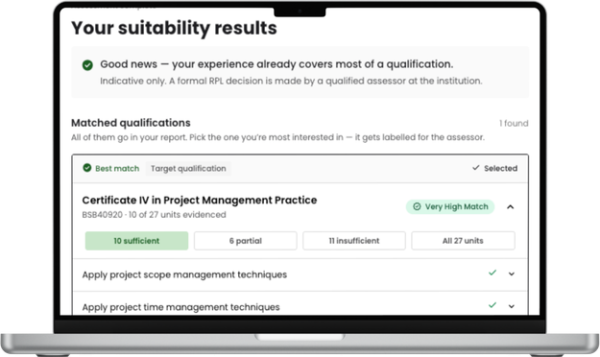
The applicant sees their results, unit by unit
Each unit shows a provisional status, a coverage rating and a plain-English summary, with up to 10 suggestions for missing evidence. The screen states clearly that this is an indicative pre-check.
They apply, and your assessor opens the report
The applicant attaches their suitability summary to your standard RPL application. At the same time, an Assessor Report appears in the provider portal with an indexed evidence register, element-level mapping and next steps.
The assessor verifies the evidence and makes the decision
Coverage is kept separate from verification, and next steps split into Verify and Gather. The assessor reviews, holds a competency conversation where recommended and records the decision through your own process.
Trust, regulation and governance
RPL is a regulated decision. AI RPL Assistant prepares the evidence and leaves the judgement with your assessor, and every result can be traced for audit.

Applicant data is handled with consent and held in Australia
Applicants consent to AI processing before uploading anything. ReadyTech runs the service under certified ISO/IEC 42001 and ISO/IEC 27001 management systems.
Results trace back to the evidence
Every finding in the Assessor Report links to an indexed document in the evidence register and cites the exact source excerpt, not a general summary.

Your assessor makes the decision
The tool is decision support only. It issues no competency outcome, has no sign-off fields and opens with a formal decision-support disclaimer.